
Google Ads has introduced two new features that give advertisers more control over how their campaign budgets are distributed across different advertising channels: Channel Prioritization and Budget Allocation.
Announced on October 14, 2026, with a gradual rollout beginning October 15, 2026, these features allow advertisers to prioritize channels and specify how much of their average daily budget can be allocated to lower-priority inventory.
For PPC marketers, this is an important development. Previously, advertisers often had to choose between enabling or excluding particular networks. These new settings provide a more flexible approach to channel-level spending.
However, there are limitations. Budget percentages are not guaranteed spending caps, and not every Google Ads campaign type supports the same level of control.
In this article, we explain what has changed, how the new features work, where to configure them, and how advertisers can use them effectively.
What Is New in Google Ads?
Google has introduced two separate but related controls:
1. Channel Prioritization
Channel Prioritization allows advertisers to assign eligible advertising channels to one of two categories:
- High Priority: Channels that Google Ads should prioritize when distributing campaign spending.
- Low Priority: Channels that can receive spending after higher-priority opportunities, depending on campaign settings and bidding objectives.
These settings help advertisers communicate which channels are more important to their advertising strategy.
2. Budget Allocation
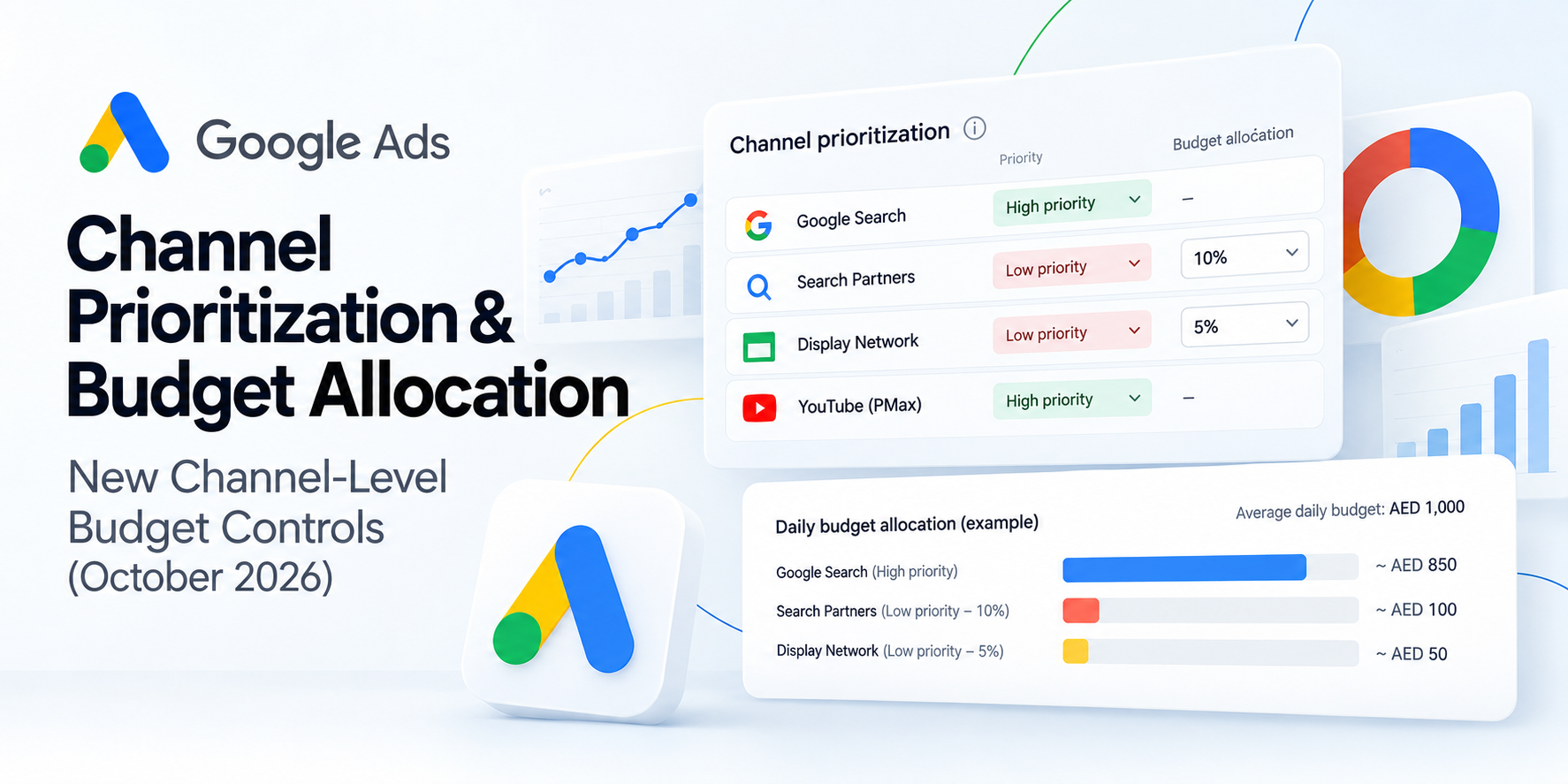
Budget Allocation allows advertisers to set an intended maximum percentage of their average daily budget for eligible channels assigned Low Priority.
For example, an advertiser could prioritize Google Search while allowing Search Partners to use up to an intended 10% of the average daily budget.
The key benefit is that advertisers can test secondary channels without giving them unrestricted access to the campaign’s budget.
Important: The allocation is a best-effort spending control, not a guaranteed hard cap.
How Does Channel Prioritization Work?
Channel Prioritization helps Google Ads understand which advertising inventory should receive spending preference.
High Priority Channels
High Priority channels receive preference when Google Ads determines how to distribute available campaign spending.
For campaigns using bidding strategies such as Target CPA or Target ROAS, Google attempts to prioritize the selected channels while still considering the advertiser’s performance objectives.
For example, a lead-generation advertiser might classify Google Search as High Priority because its search traffic produces more qualified enquiries.
Low Priority Channels
Low Priority channels can still receive spending, but they are assigned lower preference.
An advertiser might use Low Priority for Search Partners or the Google Display Network when those channels have less consistent performance.
By default, eligible channels are classified as High Priority.
Changing a channel to Low Priority does not automatically prevent it from receiving traffic. If a campaign is not constrained by budget, priority settings alone may have little effect on spending distribution.
How Does Budget Allocation Work?
Budget Allocation adds a percentage-based control for eligible Low Priority channels.
Consider a Google Ads Search campaign with an average daily budget of AED 1,000.
The advertiser could configure the following settings:
| Channel | Priority | Allocation |
|---|---|---|
| Google Search | High | Not applicable |
| Search Partners | Low | 10% / AED 100 |
| Display Network | Low | 5% / AED 50 |
In this example, Google Ads would aim to keep Search Partner spending around or below AED 100 and Display Network spending around or below AED 50 for the day.
These figures are illustrative. They are not guaranteed spending limits, and the channels are not required to spend their full allocations.
What Happens When You Set 0%?
Setting an eligible Low Priority channel’s allocation to 0% tells Google Ads not to spend on that channel.
This can be useful when advertisers want to exclude spending on particular secondary inventory through the new allocation settings.
Budget Allocation Uses Average Daily Budget
One of the most important details is how the percentage is calculated.
The allocation uses the campaign’s average daily budget, not its actual daily spending.
For example:
- Average daily budget: AED 1,000
- Low Priority allocation: 10%
- Intended daily allocation: AED 100
- Actual campaign spending: AED 600
Even if the campaign spends only AED 600, the intended allocation remains AED 100 rather than automatically decreasing to AED 60.
This distinction is important when reviewing campaign spending and interpreting channel-level performance.
Which Google Ads Campaign Types Support the New Controls?
The supported channel groups depend on the campaign type.
| Campaign Type | Channel Groups |
|---|---|
| Search | Google Search, Search Partners, Google Display Network |
| Shopping | Google Search, Search Partners |
| Performance Max | Google Channels, Search Partners, Google Display Network |
| Demand Gen | Google Channels, Google Display Network |
Search, Shopping, and Performance Max support eligible Low Priority percentage allocations as the feature becomes available.
Demand Gen supports channel prioritization but does not support the new percentage-based budget allocation control at launch.
Availability may vary because the functionality is rolling out gradually.
Where Can Advertisers Set Channel Prioritization and Budget Allocation?
Google Ads provides three levels of configuration.
1. Account-Level Settings
Advertisers can establish default priority and allocation settings for supported campaign types within an individual Google Ads account.
For example, an agency managing a client that primarily values Google Search traffic could classify Search Partners as Low Priority by default.
Account-level settings apply unless a more specific configuration overrides them.
2. Campaign-Level Settings
Individual campaigns can override the account-level settings.
This is useful when different campaigns require different spending approaches.
For example:
- A brand campaign may strongly prioritize Google Search.
- A prospecting campaign may allow more spending on secondary inventory.
- A regional campaign may use a different allocation based on local performance.
3. Shared Budget Settings
Eligible shared budgets can also use channel prioritization and budget allocation settings.
For shared budgets, the allocation percentage is calculated against the shared average daily budget rather than separately for every participating campaign.
Campaigns using the shared budget must meet Google’s supported campaign-type requirements.
Can Agencies Apply These Settings Through an MCC Account?
No. The controls cannot be configured directly at the Google Ads Manager Account (MCC) level.
Agencies must open the individual client account and configure the appropriate account-level defaults, campaign-level overrides, or shared budget settings.
For agencies managing many clients, maintaining a record of settings across accounts will be particularly useful.
Important Limitations of the New Google Ads Budget Controls
1. Budget Allocations Are Not Strict Spending Caps
Google describes these limits as best-effort controls.
Although the system attempts to stay within the selected percentage, spending can occasionally exceed the intended allocation.
Advertisers should not treat these settings as guaranteed financial limits.
2. Allocations Reset Every Day
Each daily allocation resets at the beginning of a new day.
Unused allowances do not roll over, and spending above an intended allocation on one day is not automatically deducted from the next day’s allowance.
For this reason, performance should be reviewed across multiple days rather than judged using a single day’s data.
3. YouTube Cannot Be Prioritized Separately From Search Within Performance Max
Performance Max groups Google-owned inventory into a category called Google Channels.
This grouping includes inventory such as:
- Google Search
- YouTube
- Google Maps
- Gmail
- Discover
- Other eligible Google-owned placements
Advertisers cannot use the new priority setting to rank YouTube as Low Priority while keeping Google Search as High Priority within the same Performance Max campaign.
Search Partners and the Google Display Network can be prioritized separately from the grouped Google Channels inventory.
4. Prioritization May Have Limited Impact on Campaigns That Are Not Budget-Constrained
Campaigns using Target CPA or Target ROAS bidding strategies may continue spending across eligible channels when sufficient opportunities meet their performance targets.
If a campaign is not limited by budget, changing the priority ranking alone may not significantly change spending distribution.
Where supported, percentage allocations provide a more specific control for Low Priority channels.
5. Not Every Budget Configuration Is Supported
Some restrictions apply to campaign total budgets, shared budgets, and experiments.
Advertisers should confirm eligibility before changing campaign structures or introducing new budget strategies.
How to Set Up Channel Prioritization in Google Ads
Once the feature becomes available in your account, you can configure it through the following steps.
Method 1: Set Account-Level Defaults
- Sign in to the relevant Google Ads client account.
- Navigate to Account Settings.
- Locate the Channel Prioritization settings.
- Select the supported campaign type.
- Assign eligible channels as High Priority or Low Priority.
- Where supported, enter the budget allocation percentage for Low Priority channels.
- Save your changes.
Method 2: Configure an Individual Campaign
- Open Campaigns in Google Ads.
- Select the campaign you want to adjust.
- Go to Settings.
- Find and expand Channel Prioritization.
- Choose campaign-level settings if you want to override account defaults.
- Assign channel priorities and supported allocation percentages.
- Save your changes.
If the settings are not visible, check whether your campaign is eligible and whether the gradual rollout has reached your account.
Google Ads Channel Reporting: What’s Available?
Channel-level budget controls become more useful when advertisers can measure actual performance by channel.
Performance Max Channel Reporting
Performance Max already provides channel performance reporting, helping advertisers analyze metrics such as spending, clicks, conversions, and other available performance indicators.
You can review this through:
Performance Max Campaign → Insights and Reports → Channel Performance
This information can help advertisers evaluate whether a change in channel priority or allocation is affecting the campaign’s performance.
Search Channel Reporting Expected in Q1 2027
Search campaigns currently provide network segmentation, but expanded Search channel reporting is expected in Q1 2027, according to industry reporting following Google’s product briefing.
This should be treated as an expected release window rather than a guaranteed launch date.
Until broader reporting becomes available, advertisers should use existing reporting tools together with conversion and lead-quality data.
Important February 2027 Changes for Search Campaigns
Google has also outlined changes affecting Search campaigns that use Display Expansion.
Beginning in February 2027, these campaigns are expected to move to the new prioritization and allocation model.
Advertisers should review their current settings before the change takes effect.
Google has suggested that advertisers seeking to approximate certain existing Display Expansion behavior may use:
Google Display Network: Low Priority with a 50% average daily budget allocation.
However, the 50% allocation remains a best-effort control rather than a guaranteed spending limit.
Search campaigns using Target Impression Share bidding will also stop serving on the Google Display Network as part of the announced change.
Marketers using Search campaigns with Display enabled should document their current performance and review future allocations carefully.
Practical Tips for PPC Advertisers
The new controls are most effective when supported by good campaign data and a clear testing strategy.
1. Analyze Existing Channel Performance First
Before changing settings, review the performance of Search Partners, Display, and other eligible inventory.
Focus on meaningful business metrics, including:
- Cost per qualified lead
- Cost per acquisition
- Return on ad spend
- Conversion rate
- Lead quality
- Booked appointments and sales
A channel with a low cost per click is not necessarily the channel delivering the best business results.
2. Start With Conservative Allocations
For some campaigns, testing a 5% or 10% allocation for lower-priority inventory may provide a useful starting point.
These are examples, not universal recommendations. The appropriate percentage depends on campaign performance, budget, and business goals.
3. Avoid Changing Every Campaign at Once
Start with a controlled group of campaigns rather than applying new settings across an entire account immediately.
This makes it easier to compare spending patterns, conversion performance, and channel distribution before and after the change.
4. Consider Your Bidding Strategy
Priority settings and bidding strategies work together.
For Target CPA and Target ROAS campaigns that are not budget-limited, changing priorities alone may not deliver the spending shift you expect.
Use supported allocation controls when more specific spending guidance is required.
5. Monitor Results Over Multiple Days
Because allocations reset daily and are not guaranteed caps, a single day’s results may not accurately reflect the impact of the change.
Review performance over a meaningful testing period and monitor both spending and conversion quality.
6. Prepare for the February 2027 Transition
Audit Search campaigns using Display Expansion before the announced migration.
Record existing channel distribution, evaluate performance, and determine whether new settings will be necessary.
7. Maintain Documentation Across Client Accounts
Since MCC-level configuration is not supported, agencies should maintain a clear record of account-level and campaign-level priorities.
This will help prevent inconsistent settings and improve account management.
What Does This Update Mean for Google Ads Advertisers?
Historically, advertisers concerned about spending on secondary networks often had a limited choice: leave the network enabled or turn it off.
The October 2026 update introduces a middle ground.
Advertisers can now signal which channels are most important while allowing eligible lower-priority inventory to receive spending within an intended percentage of the average daily budget.
This may be particularly useful for:
- Lead-generation businesses: Prioritizing high-intent Search traffic while testing secondary inventory.
- E-commerce advertisers: Managing eligible partner and Display spending alongside performance goals.
- Digital marketing agencies: Applying different channel strategies across client accounts.
- Performance marketers: Running controlled experiments with secondary networks instead of enabling unrestricted delivery.
However, these new settings should be viewed as budget steering tools, not replacements for campaign monitoring, conversion tracking, or performance analysis.
Conclusion
Google Ads Channel Prioritization and Budget Allocation represent a meaningful improvement in how advertisers can influence campaign spending across eligible advertising networks.
With High and Low Priority settings, optional percentage allocations, and account-level and campaign-level configurations, advertisers have more flexibility than before.
However, it is important to understand that allocations are calculated from the average daily budget, reset daily, and operate on a best-effort basis rather than as strict spending caps.
For PPC marketers, the practical next step is to review existing channel performance, check feature availability, test new allocations carefully, and prepare relevant Search campaigns for the announced 2027 changes.
Better budget controls can support better decisions, but campaign performance still depends on strategy, measurement, and ongoing optimization.
Sources and Further Reading
This article was prepared using information from Google’s official announcement and independent PPC industry coverage. The explanations have been rewritten in original language.
- Google Ads & Commerce Blog — Channel Prioritization and Budget Allocation Announcement (October 14, 2026).
- Google Ads Help Center — About Channel Prioritization and Budget Allocation.
- Search Engine Roundtable — New Google Ads Channel Controls.
- Search Engine Journal — Google Ads Introduces Channel Prioritization and Budget Allocation.
- PPC Land — Google Ads Display and Partner Spending Controls.
- Exchange4media — Advertiser Budget Control Analysis.